


But, what many ignore is that it is not only used to open the camera quickly or take photos, no. It also offers advanced control over functions such as zoom, depth, exposure and photo styles. Specifically, this is all you can do:
- One press: Open the camera and release the shutter.
- Press halfway: shows the previous menu.
- Medium double press: Open the general menu to change the settings.
Additionally, you can control these options by swiping up or down on the edge of the screen
Home Screen Customization
With iOS 18, Apple has become more Android than ever, and now you can move apps and widgets with greater freedom and at your whim, as users of the Google operating system have been doing for a long time. In fact, you can now put different elements anywhere on the screen instead of having them arranged from above.
All you have to do is long-press on a spot on your wallpaper, then drag and drop apps and widgets wherever you want.
Likewise, you can also customize app icons with color options such as Light, Dark, Auto or Tinted, creating a more personal look.
Redesigned control center
He iPhone 16 Control Center It is also quite different from what you will remember from previous models, and again it is iOS 18 that is to blame, since. now includes four different screens: media, home controls, connectivity, and a customizable favorites menu. But, you can configure them as you wish in this way:
- Swipe down to open Control Center.
- Tap the plus icon in the top left corner.
- Drag and drop controls to rearrange them.
- Use the “Add a control” option to include new buttons.

This design makes it easy to access essential functions without having to reach the top of the screen.
Explore the new Passwords app
With iOS 18, Apple introduces a Passwords app which makes it easy to manage your login details. This app is especially useful if you already save your credentials in Safari or use other Apple devices.
Thanks to it, secure access with Face ID is provided to your apps, you can create groups to easily share passwords, and all this without forgetting the automatic synchronization with other Apple devices.
Updates to the Photos app
The Photos app It has also received significant improvements. The new layout displays five photos per row, making navigation easier. Plus, it includes “Recent Days” and “People” tabs to better organize your images. Although pets are not automatically tagged, recurring people are categorized.
It is not that users have fallen in love with the application, in fact, they do not like it at all, but we recommend that you take a look at it until you get used to it, since it has much more information than before and it is not as dramatic a change as the one that many think.

The action button, previously exclusive to the iPhone 15 Pro series, is now present in all models of the iPhone 16 series. This button replaces the mute switch and offers multiple customizable functions, such as opening the camera, activating the flashlight or changing focus modes.
To choose what you can do with it, simply customize it through the iPhone settings.
- Go to Settings
- Select “Action Button.”
- Swipe sideways to explore available actions.
- Select your preferred action.
Although it currently only supports one function per touch, it is a trick for iPhone 16 Quite interesting, and you don’t have to limit yourself to just silencing your smartphone.
Try new message effects
The Messages app has received updates that improve interaction, such as support for RCS and the ability to react to messages with any emoji. Additionally, text effects are now more dynamic and allow animations to be applied to specific fragments of messages.
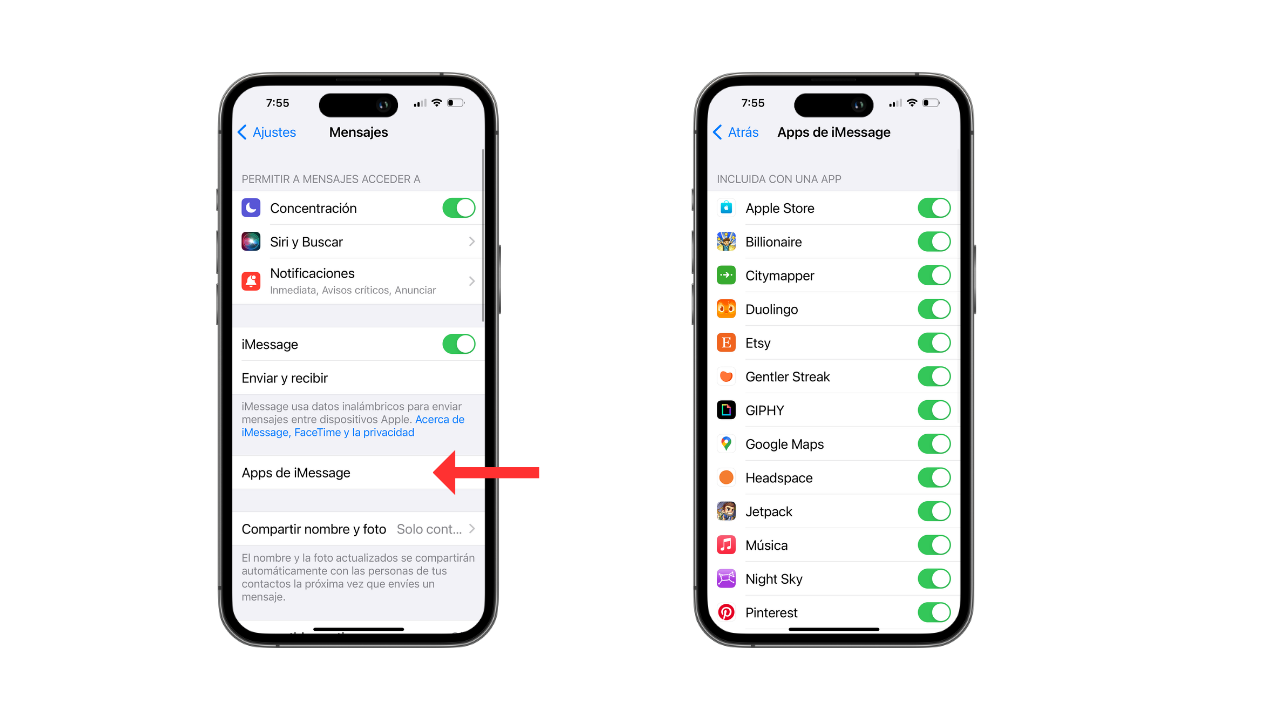
To configure them, like most of the tricks that we have already told you, all you have to do is this:
- Access Settings.
- Select the “Messages” menu.
- Explore new options to enable or disable features.


