
YouTube has announced an expansion of New advantages for its premium subscribers that reaches mobiles, the web, televisions and consoles. This change improves audio quality, expands reproduction control and facilitates navigation by long videos on televisions. If you use YouTube daily on Android or your Smart TV, these novelties can save you time and offer you A more careful experience.
Although they are not revolutionary changes, they include practical improvements in key aspects: greater speed control, better audio quality in the main app and shortcuts that facilitate access to the key moments of a video. Besides, YouTube Shorts He also wins whole in iOS with functions already enjoyed by Android users.
4x reproduction speed and granular control in Android, iOS and web
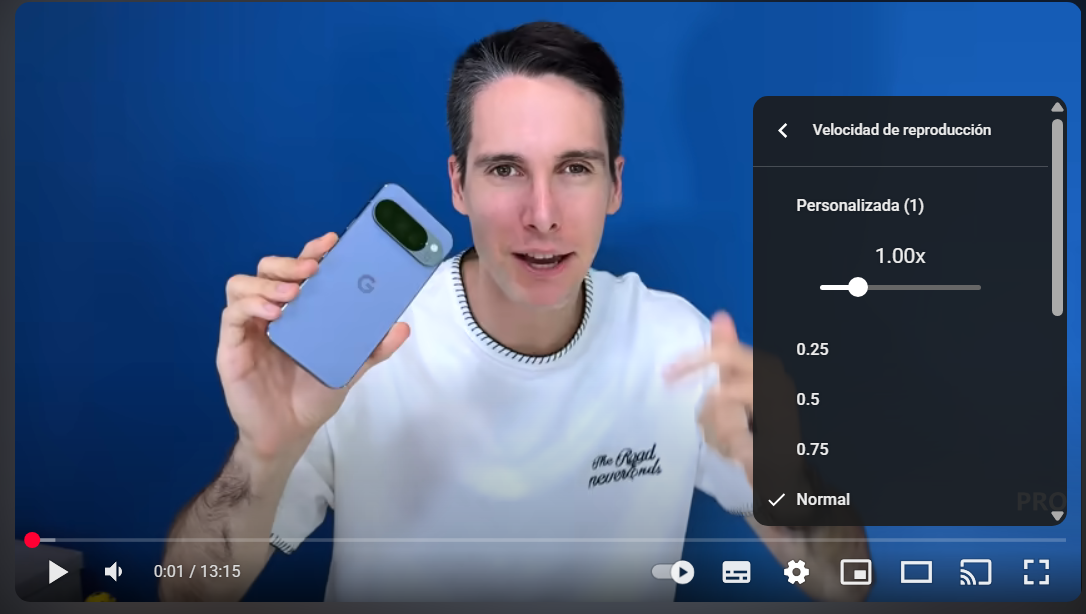
Until now, the fine speed adjustment was restricted and forced to go through limited options. With the new wave of functions, Youtube premium allows you to reproduce up to 4x and adjust in 0.05x increases both in Android and in iOS and in the web version. Although it looks like a minor change, it can make a difference by following classes, podcasts or tutorials, since it allows to better adjust the balance between understanding and speed.
In addition to saving time, this granular control avoids sudden jumps between fixed steps. If you usually alternate between 1.5x and 2x, be able to move by stretches of 0.05x helps Customize the rhythm. The result is a more comfortable and precise reproduction that you will probably end up using regularly, depending on the type of content.
High quality audio in the main app: 256 kbps for music
Another improvement points to the sound: The main YouTube apps allows you to choose the “high” quality For official musical videos and the so -called Art Tracks. We talk about one 256 KBPS Bitrate Bits Rate (Bitrate)a figure higher than that many users had by default on YouTube and that was previously reserved for YouTube Music or limited evidence. If you are premium and listen to music from the app itself, you will perceive greater sharpness.
To activate it, it is enough to open a compatible musical video clip and enter the audio settings To select the highest quality audio option. Keep in mind that this audio mode of High quality applies to musical content concrete (official video clips and Art Tracks); In the rest of the videos, the experience continues to depend on the sound track that each creator uploads.
“Jump Ahead” on televisions and consoles, and improvements on YouTube Shorts for iOS
The function “Jump Ahead” (or “jump forward”) make the leap to the living room: now you can Go directly to the key moments of a video From your smart tv or console. It is especially useful in analysis, direct and long tutorials, where hop From the Intro to the crux, several attempts with the command usually require. Thanks to this function, YouTube detects relevant segments and presents them directly so that you do not lose the thread.
In mobiles it was already a known tool, but its arrival on televisions and consoles Simplify the experience on large screens and reduce friction when navigating with command. For those who see YouTube as a traditional TV substitute, it is an improvement that will be noticed daily.
YouTube Shorts on the iPhone: Picture-in-Picure and Automatic Downloads
YouTube too Complete in iOS two functions that were already on Android: Picture-in-Picure (PIP) for YouTube Shorts and Automatic downloads. With the PIP, you can keep a short in a floating window while doing other tasks on your mobile. And with automatic downloads, the apps app RECOMMENDED shorts to see without connectionideal when you run out of data or coverage. On the whole, YouTube Shorts It becomes more flexible and consistent between platforms.
More value for YouTube Premium in Android and TV
These novelties do not change the rules of the game, but they do Tangible value To the Premium YouTube quota: fewer ads, more control and a more careful experience on all your devices. If you consume music on YouTube, the jump to 256 Kbps In the main app is a good reason to stay, and if you watch long videos on TV, Jump Ahead It will save you time every afternoon.
Now with the recent novelties both in the rYouTube Music Ec producerand now with the audio quality jump on YouTube Premium, the experience will be much more complete to compete directly with Spotify.
Do you use Premium YouTube? What interests you more: The highest quality audio, 4x speed either “Jump Ahead” On your smart tv? We read you in the comments.