
Google has just broken down one of the most annoying walls between Android and iOS: from now on, the function Quick Share Android can send and receive files directly from and to AirDrop on Apple devices, starting with the family Pixel 10. Photos, videos or documents are transferred from one device to another without the need for additional applications or complicated procedures.
It is the first time that there is a native, official and two-way method to share content between an Android and an iPhone without resorting to third-party solutions. At the moment the novelty is limited to the Pixel 10but Google has already confirmed that it will be expanded to more Android phones in the future, so it doesn't seem like something specific.
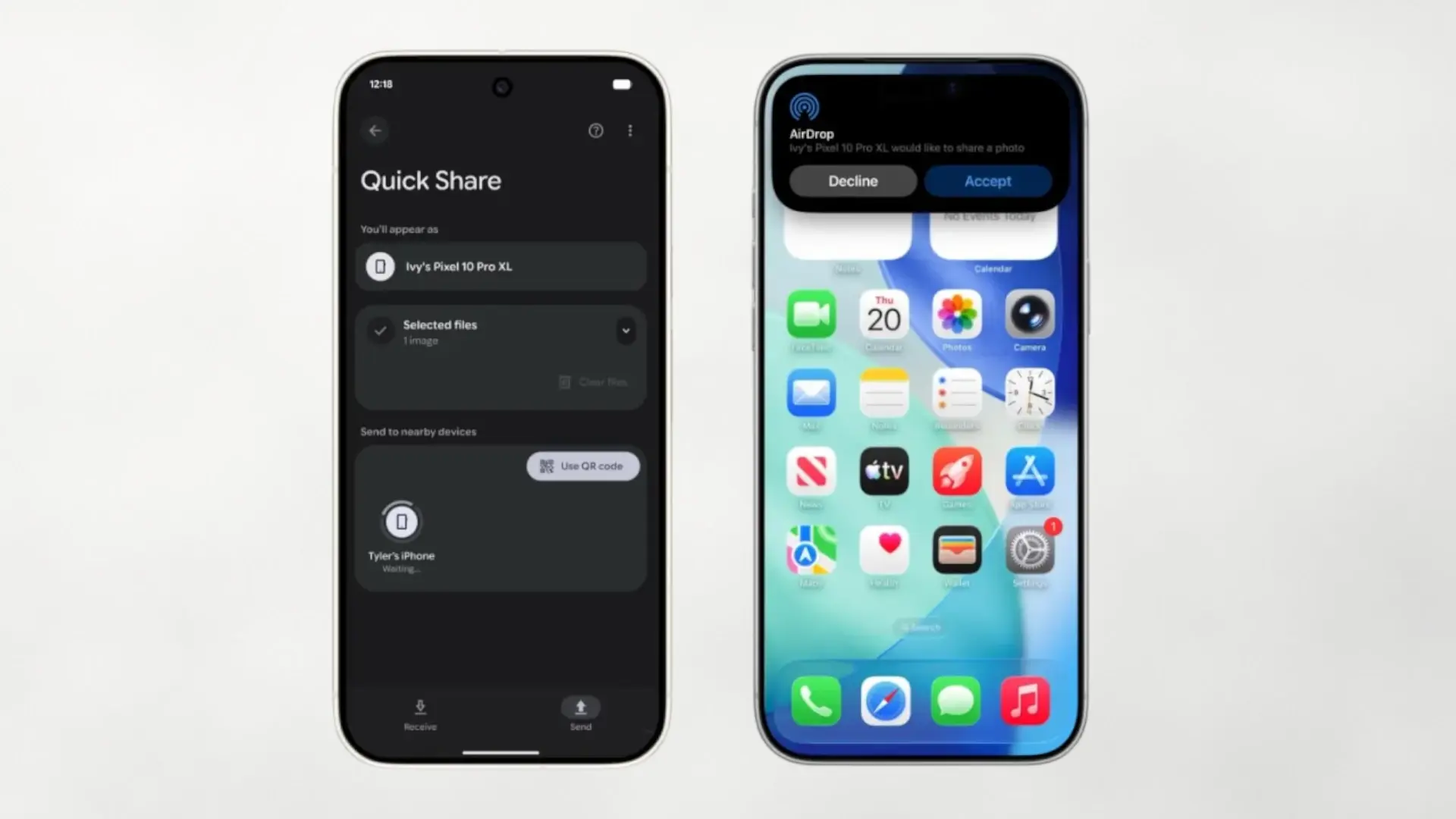
In practice, using this function is quite simple, although it has an important condition on Apple's side. For a Pixel 10 see an iPhone, iPad or Mac as a destination, the owner of the Apple device must activate AirDrop in mode “Everyone for 10 minutes”. While this window is active, the Android mobile detects the device as if it were another Android device within Quick Share.
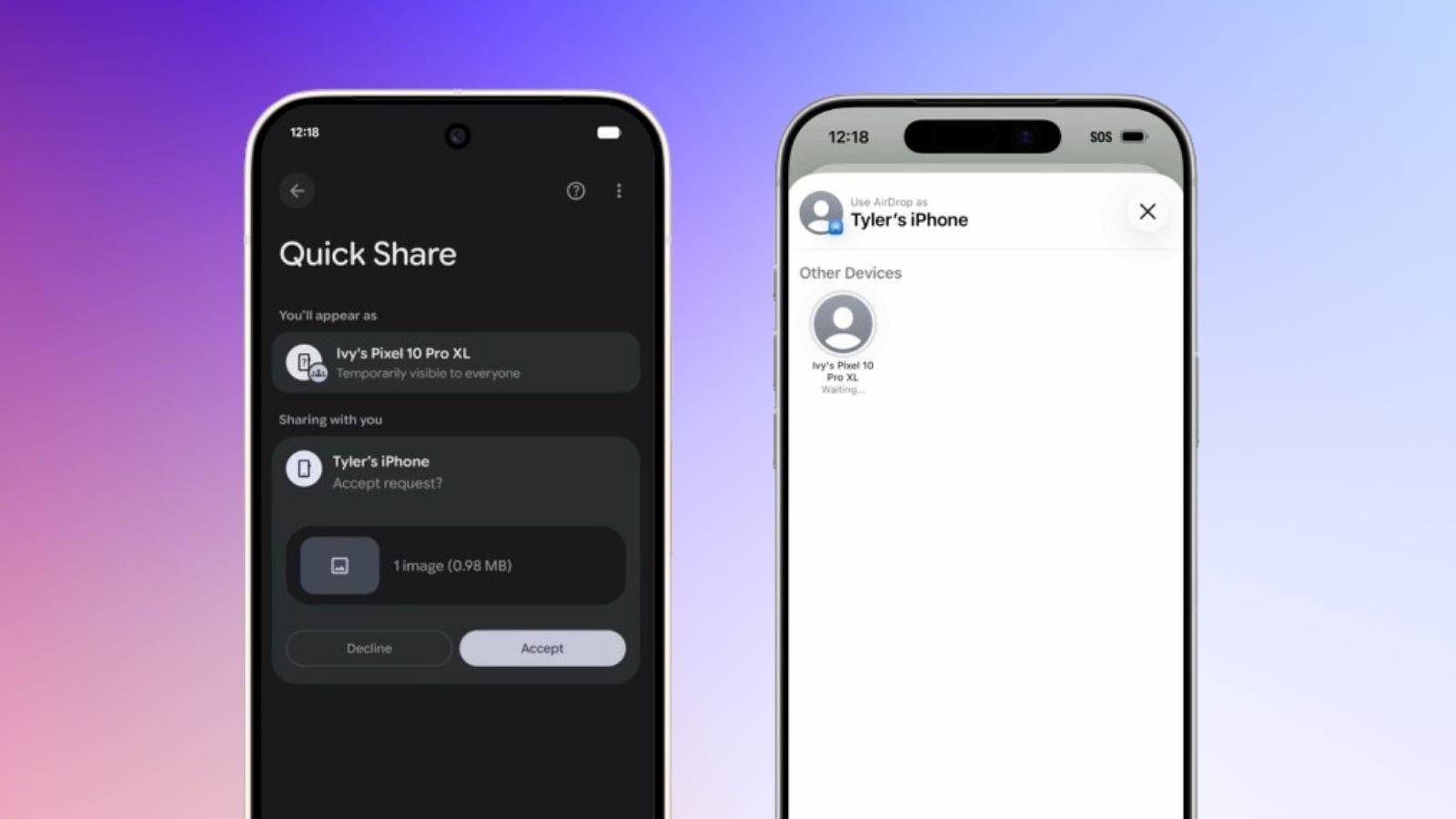
From the Pixel 10just choose the photo, video or file we want to send, tap Share and select Quick Share. In the full screen interface, the Apple device will appear as the available destination; By tapping it, the recipient will see an AirDrop prompt on their iPhone or Mac and can accept or reject the transfer, just like with any other AirDrop.
Interoperability also works the other way around. If the iPhone user wants to send something to a Pixel 10you will need to select AirDrop and choose the Google phone as the destination. To receive, the Pixel 10 must be visible in Quick Share, either in “Everyone for 10 minutes” mode or in specific mode Receive.
For all this to work, Google indicates that owners of a Pixel 10 They must have the system updated and verify in the settings that the extension of Quick Share is up to date. The procedure to access it is somewhat convoluted: Settings > tap your name at the top (Google Services) > All services > Privacy and security > System services, and there update 'Quick Share Extension' and restart the phone.
Privacy and security: direct connection and Rust under the hood
Google insists that this integration between Quick Share and AirDrop doesn't use weird shortcuts nor intermediate tunnels: the transfer is carried out through a direct and peer-to-peer connection between the two devices, without going through any company server. That means no content is uploaded to the cloud, no additional logs are saved, and no more information is shared than necessary.
The implementation is developed in rusta programming language focused on memory safety, something that helps avoid typical vulnerabilities such as buffer overflows and other flaws that are exploited in attacks. In addition, Google assures that it has applied its usual process of threat modeling, internal security reviews and penetration testingand that even a specialized external firm has audited the solution to validate its robustness.
That doesn't completely eliminate the risks that come with any nearby file-sharing system. For communication to occur in both AirDrop and Quick Share, visibility must be opened to “Everyone for 10 minutes,” which may allow other nearby devices to attempt to send unwanted content. The good news is that it always requires manual user acceptance before it is received no contentand in sensitive environments these types of functions can be disabled at the system or company policy level.
Quick Share was born from the merger of the old Google Nearby Share with Samsung's solution of the same name, becoming the standard for sending files between Android, ChromeOS and even Windows devices. Now, with this step, it begins to break down the hardest barrier: the one that separates the Android ecosystem from that of Apple, where it has always been more complicated to understand each other.
For now, AirDrop support debuts exclusively in the Pixel 10, Pixel 10 Pro, Pixel 10 Pro XL and Pixel 10 Foldbut Google has already made it clear that the idea is to bring it to more Android phones over time. He has also said that he would like to collaborate with Apple so that, in the future, this communication works even in AirDrop mode. “Contacts only”something that is not possible today.
Beyond the technical fine print, the initiative aligns with Google's strategy of reducing barriers between platforms and indirectly responding to the criticism of those who speak of “green bubbles” and closed ecosystems. It's not that Android and iPhone suddenly become best friends, but they do agree a little more on tasks as basic as taking some photos from the weekend.
A small breakthrough for sharing between Android and iPhone
For users of a Pixel 10this novelty means that it will be much easier to share content with friends and family who use an iPhone, iPad or Mac without always depending on WhatsApp, Telegram or cloud links. And the best thing is that you don't have to learn anything new: Quick Share and AirDrop behave practically the same as before, only now they understand each other.
If the rollout to other Androids arrives quickly, we could be facing the first de facto standard for sharing files between mobile phones. different platforms in a simple and secure way. It remains to be seen what role Apple plays in all this, but the ball is clearly in its court.
How do you see it? If you had this option on your current mobile, Would you use it daily or would you continue using messaging apps to send photos and documents?