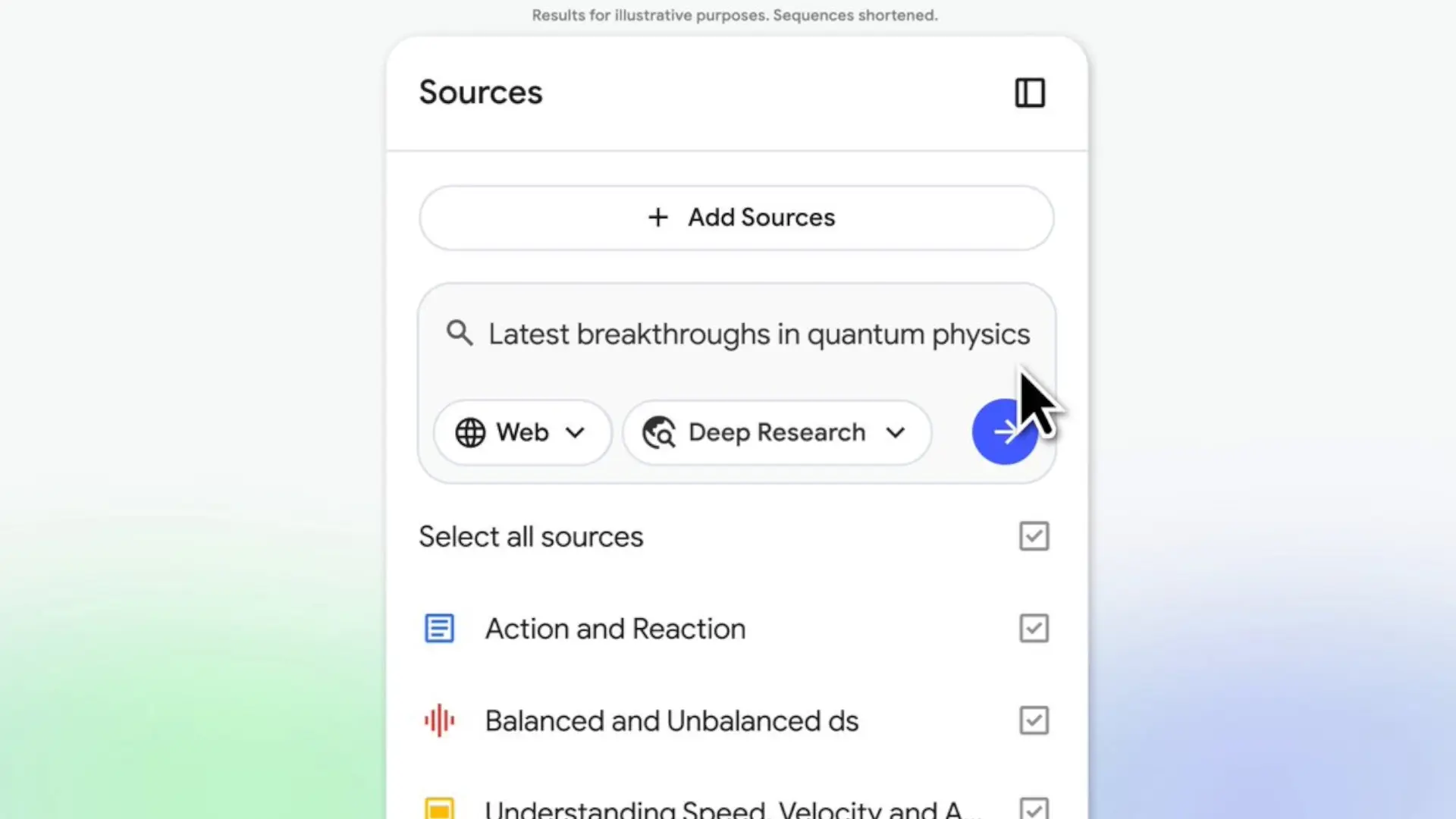

NotebookLM, Google's research assistant based on artificial intelligence (AI), takes an important leap with the arrival of Deep Researchthe same advanced research engine that we already knew in Gemini. From now on, the tool can examine and summarize hundreds of web pages in depth for you, and return a structured report with well-cited sources, designed for studying, preparing papers or documenting complex projects without the need to have multiple browser tabs constantly open.
The novelty also comes at a key moment: in recent weeks, Google has reinforced NotebookLM with study cards, questionnaires and a much more powerful chat, accessible from your mobilewhich makes the service an integral tool for students, content creators and professionals who work from their laptop or Android mobile. Deep Research fits right into that puzzle as the “investigator mode” that takes care of the hard work of tracking down information.
What Deep Research can do within NotebookLM
Deep Research works as a automated research agent within NotebookLM. You enter a complex question and the tool generates a work plan, browses the web, consults documents, and refines the search as you go. After a few minutes, it returns a organized and cited reportin which you can see what sources he has used and how he has reached each conclusion, something very useful when you need to trust what you are reading.
Within NotebookLM you will now see two research styles: Fast Researchwhich is the old quick search and is used to locate sources on the fly, and Deep Researchdesigned for a complete briefing. The interesting thing is that you can add your own materials – documents, links or videos – at the same time that the report is generated in the background, and then reuse everything in the chat, in the audio summaries or in the explanatory videos that the tool itself creates.
Deep Research data sheet in NotebookLM
- Function type: AI research agent integrated into NotebookLM.
- Available modes: Fast Research (quick search) and Deep Research (full report).
- Scope: Analyzes hundreds of web pages per query and combines online results with sources you upload.
- Integration: Reports and their sources are added to the notebook and power features such as Audio Overviews, Video Overviews, flashcards, and quizzes.
- Availability: progressive rollout to all NotebookLM users throughout the week, with support for images planned for the coming weeks.
- Limits of use: Free accounts can use Deep Research only a few times a month, while paid plans expand the number of reports, notebooks, and feeds.
More file types: Sheets, Word, images and PDFs
The other big improvement is that NotebookLM Now you understand many more common work formats. You can add Google Sheets for AI to help you with statistics and spreadsheet summaries, directly paste web links (URLs), from Google Drive files, import portable document format (PDF) files from Drive without downloading them, uploading photos, images or handwritten notes and work with documents Microsoft Word in DOCX format without having to convert anything.
For those who live surrounded by technical specifications, press releases, data sheets and screenshots, this allows practically all the material for a project in NotebookLM to be gathered in one place. There is no need to switch between different applications: you load your sources, launch a search with Deep Research on the topic you are interested in, and then generate summaries, study guides or scripts directly from the same place, something especially useful in daily work.
Deep Research significantly reinforces the usefulness of NotebookLM for users in Spain
Google has confirmed that these Deep Research news and the new formats are being activated for all NotebookLM users and will arrive in a matter of days. The service was already available in more than 200 countries, including Spainand offers functions such as audio and video summaries also in Spanish. Additionally, Deep Research is free in its basic version, although limited to a few reports per month; If you need more, the payment plans associated with Gemini expand the limits.
With this move, NotebookLM goes from being a simple smart note organizer to a complete research centerespecially combined with the Android application and its cards, quizzes and chat with more memory. If you already use your mobile to study or prepare scripts, this “researcher mode” may be just what you were missing to better organize your ideas without wasting time opening tabs like crazy. Are you going to try Deep Research in NotebookLM for your next work or projects from your mobile?