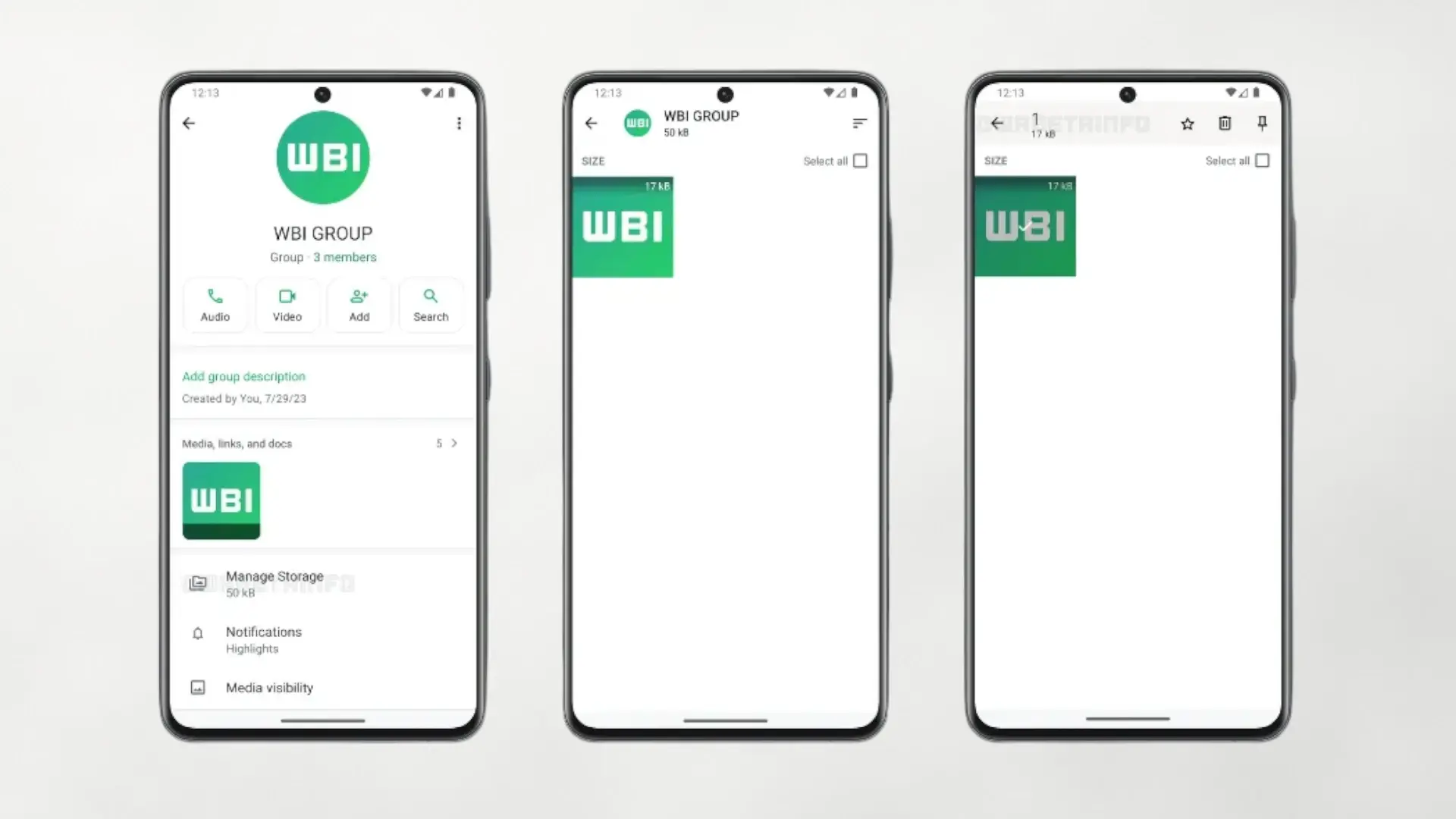

WhatsApp is working on a feature that promises to put an end to the classic “storage almost full” without forcing you to delete your entire history. The novelty adds a direct access to manage the space of each chat from the chat information screen, so you can quickly detect and delete large files from that group of friends or family chat that takes up the most space.
Until now, controlling WhatsApp storage required entering “Settings > Storage and data > Manage storage”, an impractical global view when you only want to clean up a specific conversation. With the new chat storage manageryou will be able to see how much photos, videos, audios and documents of that conversation take up and select what to delete without leaving it, keeping the messages if you prefer.
How the new chat storage manager will work
📝 WhatsApp beta for iOS 25.31.10.70: what's new?
WhatsApp is rolling out a feature that lets users manage storage from the chat info screen, and it's available to some beta testers! pic.twitter.com/fetvlnIGdd
— WABetaInfo (@WABetaInfo) October 24, 2025
According to the most recent beta versions, the option appears in the chat information screen (“Media, links and documents”). From there, WhatsApp will show a breakdown by file type and a list of items sorted by size to make cleaning easier. The goal is clear: manage heavy content in detail and free up storage without sacrificing all history.
This approach fits with another recurring user request: having more precise tools to decide which media to keep and which to deleteespecially in very active groups where videos and voice notes are shared daily. Being able to act conversation by conversation saves steps and avoids navigating through deep menus when you're just looking to recover a few hundred MB quickly.
When will it come to Android and iOS and what changes compared to today
The feature is rolling out on a limited basis in beta: Android (version 2.25.31.13) and iOS (version 25.31.10.70). As usual, its availability will expand in waves before reaching the stable version. Meanwhile, the current method is still to use the “Manage storage” section and, within each chat, review “Media, links and documents”, where it is not always clear how much space each file takes up.
The change is important for two reasons. First, because reduces friction– Fewer taps and clearer context for making decisions. Second, because it allows keep your messages and delete only what really matters (repeated videos, old voice memos, documents you no longer need), without needing to delete the entire history when you run out of space.
A practical solution to the eternal problem of space
If you have had WhatsApp eat up your mobile memory, this small adjustment will save you time and trouble. Chat management focuses on what takes up the most and allows you to clean surgically, without losing entire conversations. On the other hand, another great function that many of us expect is the username integrationsomething we have been waiting for for a long time. But do you think WhatsApp should add additional options, such as scheduling automatic cleanings per conversation or rules to delete old videos? We read you in the comments.