Google has launched a New “Google App for Windows” As an experiment within Google Labs. The idea is simple and powerful: with a keyboard shortcut you can open a floating bar that seeks local archives, installed applications, Google Drive documents and on the web From the same place. For those who alternate between an Android mobile and a PC, it is a proposal that promises to save clicks and time.
Beyond being “another app” by Google, the movement reinforces the company's presence on the Windows desktop, where solutions such as Google Drive, Google Photos, Quick Share (formerly Nearby Share) and Google Play Games already live together. Now, this app adds Google Lens and a mode of responses with artificial intelligence (AI) on the PCapproaching mobile functions such as “Circle to Search” to the work environment.
What does the new Google App for Windows offer?
The interface is minimalist: a Search box that appears on any window when you click «Alt + Space». From there you can locate team archives, open applications, consult Google Drive and launch searches on the web. The results are grouped so you can access the element you are looking for with a single click.
Integra Google Lens next to the bar. With him you can Select any part of the screen To translate text, copy content as text or as imageand even obtain contextual information. In essence, it adapts that popular android gesture that allows “to look for what you see” without changing the window.
The app also incorporates artificial intelligence mode (AI Mode), which offers generative responses with links and follow -up questions. It is useful for complex doubts or when you want to expand the consultation without opening the browser. Everything happens in the same superimposed panel, which avoids interrupting the flow when you are writing, editing or playing.
Requirements, availability and how it is installed
At the moment, the Availability is limited: The experiment is only in English and limited to users of the United States. To activate it you have to join Google Labs From the PC and download the installer when you are enabled in your account. There is no cost; It is an early access experiment.
In addition, there is an important restriction: the application It only works with personal accounts of Google. It is not compatible with Google Workspacenot even with educational accounts. As for the system, it is Windows 10 or more recent.
Quick Requirements and Activation Summary:
- Have a personal Google account and be at least 18 years old.
- Windows 10 or more recent.
- Join Google Labs and enable the “Google App for Windows” experiment.
- Default shortcut: Alt + space (It can be changed in adjustments).
How it fits in the ecosystem and why Android uses interest
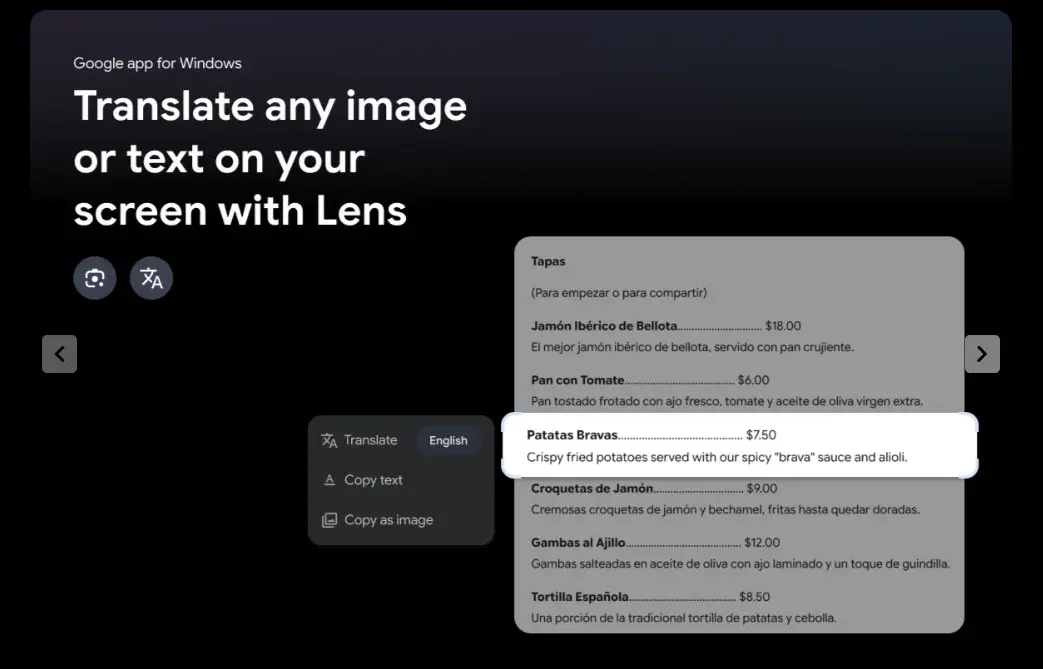
If you already use Android, the proposal will be familiar to you. In mobiles, the gesture of “Look for what you see” With Lens or «Circle to Search»It has become frequent. Bringing that logic to the desktop means less alternate between windowsless copy and paste and a more natural transition between local content, the cloud (Google Drive) and the web.
In front of native options such as Windows Search or Powertoys Runor utilities of third parties such as macos spotlight, the differential key here is in Lens's layer and direct access to Google search capabilities. For users who already depend on the Google ecosystem on the mobile, it is a plus of continuity on the PC.
It is also a step consistent with Google's recent strategy in Windows: Improve the connectivity between devices (Quick Share), facilitate the Access to your cloud data (Google Drive) and now Reduce friction When searching or launching rapid actions without opening the browser.
One more Google step in Windows: what we expect below
This first launch is experimental And with limited capacity, so there will be iterations. If it reaches More languages and countriescan become a key tool for those who alternate between Android and PC in their day to day. We would like to see deepest integrations (for example, with Google Photos, Keep or Google Calendar) and Clear Privacy Controls For the local part and the search history.
What do you think of this bet? Would you use it on your PC when available in Spain or do you prefer to continue with the native Windows options?